
Getting Around CattleMax
Welcome to CattleMax! The navigation menu on the left side of your screen is where you'll access the main areas of your ranch records. As you begin working with your herd, you'll also spend a lot of time on each animal's profile, where you can view and manage the complete history of each animal.
Settings
Your Account Settings are located in the upper-left corner of CattleMax by clicking the settings gear. ⚙️
Settings allow you to customize how CattleMax works for your operation, including:
- Ranch and account information
- Add Users and set role permissions
- Animal ID and numbering preferences
- Record defaults
- Enabled features
- Other account-wide preferences
We recommend reviewing your Settings before entering a large amount of data. Taking a few minutes to customize your account now can save time later and make CattleMax work the way your ranch operates.
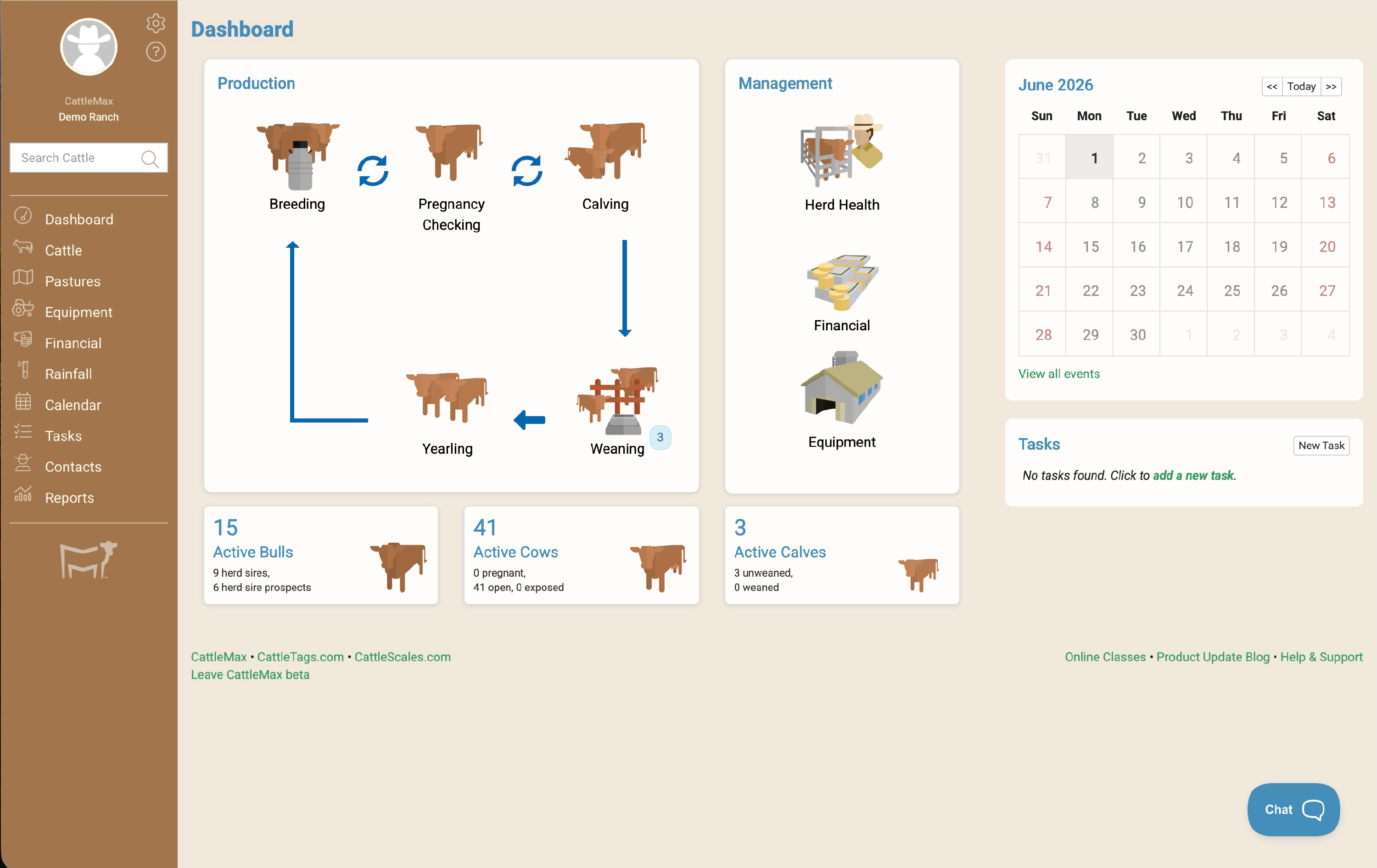
Dashboard
The Dashboard is your starting point each time you log in. It gives you a quick snapshot of what's happening across your operation so you can stay organized without digging through records.
On your Dashboard, you can:
- View upcoming reminders and important events
- See your current cattle inventory
- Quickly access production and health records with clickable dashboard icons
- Stay on top of tasks and items that need your attention
- Use the search bar to search for your animal profiles
Make it a habit to start your day on the Dashboard to quickly see what's happening around your ranch.
Cattle
The Cattle section is where you'll spend most of your time. This is where all of your herd records are stored.
From here you can:
- Add cattle one at a time, in bulk, by importing a spreadsheet, or from a connected breed association
- Organize your herd with Smart Groups and Manual Groups
- Star frequently used groups for one-click access
- Monitor production data and quickly navigate using clickable icons
- Access breed association features and connected services (Registered edition)
Pastures
Use Pastures to organize where your cattle are located and keep records for each pasture.
You can:
- Create grazing pastures, hay fields, or paddocks
- Move cattle between pastures
- Track pasture activities (rotations, turn bull in/remove bull)
- Record hay production and fertilizer applications
- View current pasture inventories & maps
Other Areas of CattleMax
In addition to managing your herd, CattleMax includes several tools to help you organize and manage your entire operation.
- Equipment – Track tractors, trailers, implements, and other equipment, including maintenance schedules and service history.
- Financial – Record ranch income and expenses, track cattle sales and purchases, and generate financial reports.
- Rainfall – Keep a history of daily rainfall totals and compare rainfall over time.
- Calendar & Tasks – Stay organized with upcoming events, reminders, breeding schedules, and ranch to-do lists.
- Contacts – Store contact information for customers, buyers, veterinarians, suppliers, and other important ranch contacts.
- Reports – Analyze your herd with built-in reports and worksheets. CattleMax includes a variety of standard reports, and you can create unlimited custom reports—all fully customizable for your operation.
Animal Profiles & Timelines
 The Animal Profile is the central hub for managing an individual animal. You'll find everything you need to view, update, and manage its records in one place.
From the Animal Profile, you can:
- View the animal's identification, ownership, and current status
- Record breeding, pregnancy, calving, health, weights, performance, and other production data
- View photos, notes, documents, and custom fields
- Quickly add activities like breeding, treatments, and movements
- View all recorded events in date order on the animals timeline
If you're trying to answer the question, "What has happened to this animal?" the Timeline is the best place to start.
Where Should I Start?
If you're brand new to CattleMax, we recommend following this order:
- Review your Settings and customize your account.
- Visit the Dashboard to become familiar with your home screen.
- Begin adding your cattle and exploring animal records.
- As you become more comfortable, start using the remaining sections.
The fastest way to get started in CattleMax is to import your herd from a spreadsheet. If you already have records in Excel or another spreadsheet program, you can add multiple animals at once instead of entering them individually.
This guide will walk you through preparing your spreadsheet and importing your inventory into CattleMax.
Need Help?
If you'd like help importing your data or have questions along the way, our team is here to help.
For personalized assistance, schedule a Success Session via Zoom. You'll meet one-on-one with a member of our rancher-based support team who can help review your spreadsheet, answer questions, and guide you through the import process.
Need a quick answer? Reach out by email, chat, or phone.