
Partner Connection with Prime Pursuits
We are pleased to announce a partner connection with Prime Pursuits. This integration enables you to import and export animal treatments, weights (including background details), carcass data, and animal lists between your CattleMax account and the Prime Pursuits (Prime Intelligence) system. Your records stay up to date in real time, helping you make informed decisions faster and with fewer manual steps.
Step 1: Setting up the Partner Connection
From the Dashboard of your CattleMax account, go to Settings and then click on Partner Connection. Select the Prime Pursuits button to activate the partnership on your account.

Step 2: Exporting to Prime Intelligence from CattleMax
Once connected, you can start by exporting data to Prime Pursuits (Prime Intelligence) or importing it back into your CattleMax account (see Step 3).
Use either a Cattle Group or Sale ticket to export data. This will include animals, weights, and treatments. Once you upload, it may take a few minutes for the PI servers to populate your data.
 Step 3: Importing data back from the Prime Intelligence system
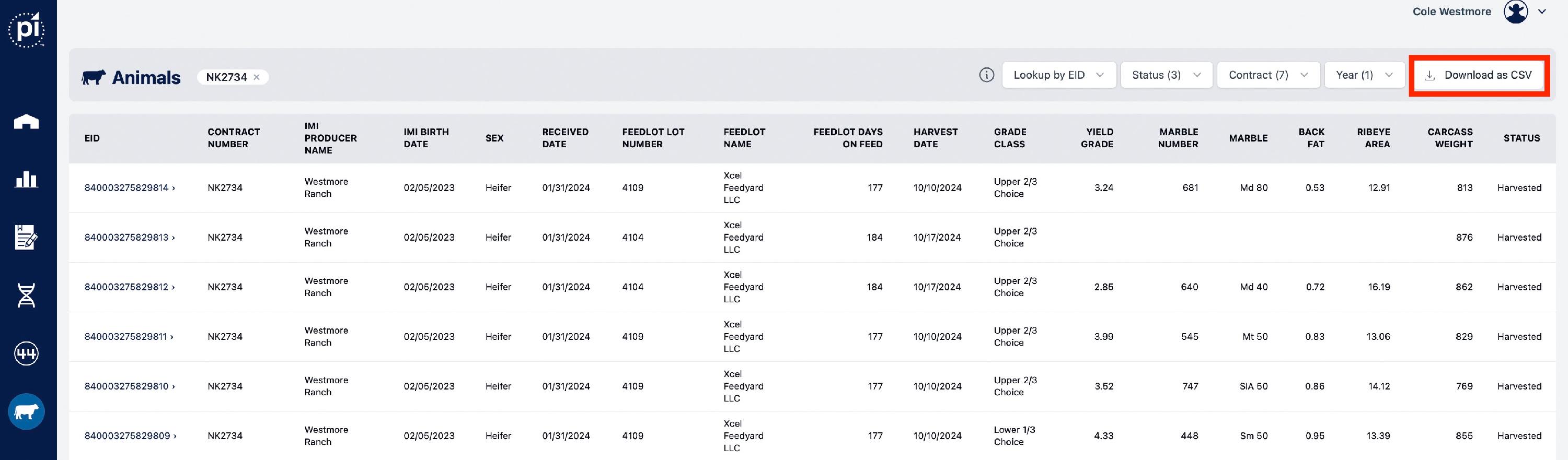
In your PI account, you can download a CSV file containing carcass, genomic, and measurement data. Please do not open this file before importing, as doing so may affect the data formatting. Animals must already exist in your CattleMax account and have matching Electronic IDs (EIDs) to be updated.
CattleMax does not have direct access to your Prime Intelligence account, nor does Prime Pursuits have access to your CattleMax data. No login credentials, financial data, or other data are directly shared. As the customer, you choose when to import and export.